Toronto Live City Map
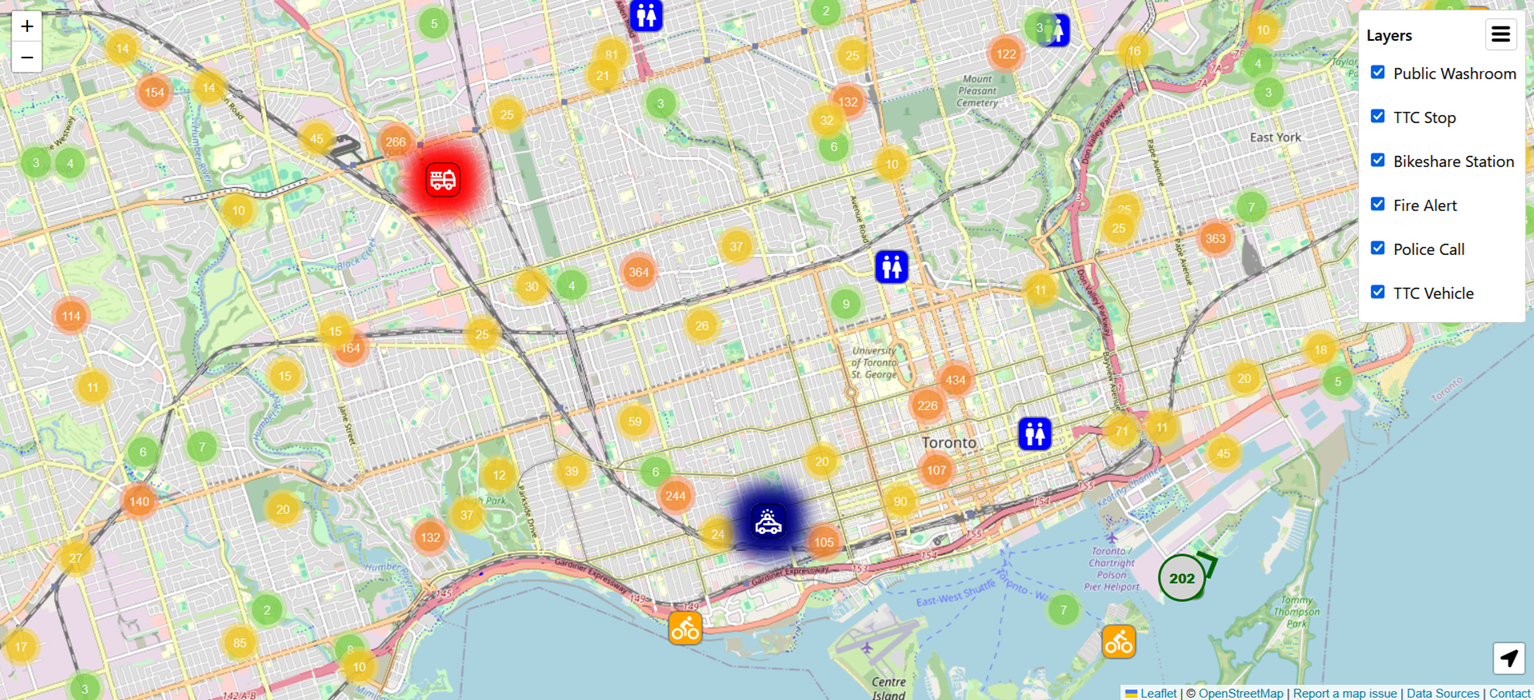
A full-stack geospatial web application that serves as a real-time operations dashboard for the city of Toronto. Designed as a centralized platform for exploring public transit, emergency presence, and civic infrastructure.
 React
React
 JavaScript
 TypeScript
 Leaflet.js
 Node.js
 Express
 Vite
Vite
 ESLint
 Prettier
 Git & GitHub
 GitHub Actions
 Porkbun
 Railway
Table of Contents
- Overview
- Core features
- Tech Stack and Tools
- Data Sources
- Deployment Architecture
- Challenges and Solutions
- Technical Decisions
- Frontend/Leaflet Decisions
- Accessibility Challenges and Solutions
- Contact Information and Email Obfuscation
- Search Engine Optimization
- Backend Memory Optimization
- Future Improvements
- Conclusion
Overview
Toronto Live City Map is a full-stack geospatial web app that acts as a real-time dashboard for the city of Toronto: a single place to see public transit, emergency activity, and civic infrastructure, pulled from several city-owned datasets and put on one map.
The idea started from a simple annoyance: if you want to know where the next streetcar is, where a nearby bike is available, and whether there’s an active fire incident near your route, that’s three different websites. This app puts all of it in one interface, updating live as the underlying data changes.
Building it meant integrating both static and real-time municipal data through asynchronous API requests, and dealing with the fact that every source formats things differently (JSON, GTFS, GBFS, plain text, XML). Making all of that feel like one coherent map, instead of five datasets awkwardly stitched together, ended up being most of the actual engineering work.
Technically, the project touches full-stack development, API integration, geospatial visualization, and interface design, with a fair amount of attention on rendering performance and keeping things responsive while data updates underneath the user in real time.
It’s also meant to be genuinely useful day to day: a live view of transit, emergency services, bike share, and public amenities that residents, commuters, cyclists, and visitors can actually check before heading out.
Core features
The core features for this project include:
- Live TTC vehicle tracking: Display the (semi) real-time locations of buses and streetcars across the transit network (data for trains are unfortunately not available). The application aims to update vehicle location every 10 seconds. This was briefly dropped to every 5 seconds while chasing what looked like a bug causing delayed updates, but the upstream TTC data itself only refreshes somewhere between 20 and 40 seconds regardless of local polling frequency, so it was reverted back to 10.
- Police and fire service activity: Visualize the locations of active emergency service presence to improve situational awareness. The application aims to update police activities every 20 minutes and fire service activities every 5 minutes.
- Bike Share Toronto stations: Allow users to locate nearby cycling stations and monitor station availability. The application aims to update station information daily while updating the station status information every 10 seconds.
- Public washroom locations: Make public amenities easy to find while travelling throughout the city. The application aims to update washroom statuses daily.
- TTC stops and stations: Provide a complete view of transit infrastructure alongside live vehicle movement. The application aims to update static stops and station information biweekly, while updating alerts every minute and arrivals every 30 seconds.
Detailed Information of Core Features
In addition to the coordinate locations of each core feature, additional information can be obtained on request by clicking on their respective markers. Popups are displayed for each marker on the map to provide more comprehensive and detailed information for each feature.
Below are what’s included within each feature’s popup:
1. Live TTC vehicles
- Route
- Vehicle ID
- Bearing
- Speed
- Occupancy status (how packed it is)
2. Police activity
- Police division
- Call type (the reason for police presence)
- Cross streets
- Occurrence time
3. Fire service activity
- Incident type
- Prime and cross streets
- Dispatch time
- Alarm level
- Dispatched units
4. Bike Share Toronto stations
- Station name
- Station ID
- Whether it’s a charging station
- Number of docks available
- Number of bikes available
- Type and number of each available bike
5. Public washroom locations
- Washroom name
- Status
- Hours (usually an external link)
- Address
- Location of washroom at address
- Type
- Accessibility considerations (if available)
- Reason (if the status isn’t open)
- Additional comments from the building
6. TTC stops and stations
- Name
- Code
- Alerts (ID, description)
- Arrivals (route, headsign, time)
Tech Stack and Tools
Frontend
- React (with CSS modules)
- Leaflet (with MarkerCluster and LocateControl plugins)
- JavaScript
- TypeScript
Backend
- Node
- Express
- TypeScript
Testing
- Vitest
Domain + DNS
- Porkbun
Email Communication
- Porkbun email
- Forwarded domain’s custom email to personal email by following a guide by Gourav Goyal
Hosting (Frontend + Backend) + SSL
- Railway
Client-Server Communication
- REST (for static and detailed information)
- Server-Sent Events (for transmitting real-time data)
Code Quality
- ESLint
- Prettier
CI/CD
- GitHub Actions (Super Linter, Setup Node)
- Railway auto-deploy
Data Sources
The data used by this project are licensed under the Open Government License - Toronto and Open Government License - Ontario. More specifically, the following data sources are used:
- Surface Routes and Schedules for BusTime
- TTC BusTime Real-Time Next Vehicle Arrival (NVAS)
- TTC GTFS-Realtime (GTFS-RT)
- Bike Share Toronto
- Park Washroom Facilities
- Toronto Fire Active Incidents
- Toronto Police Service Calls for Service
The links above act as gateways to the endpoints used for the API calls, which can be found when digging deeper.
Deployment Architecture
The application requires a persistent backend process because Server-Sent Events require long-lived connections. This makes serverless platforms less suitable because serverless functions are designed for short-lived requests and may terminate after execution.
The application is deployed Railway, and the deployment workflow is as followed:
- Code is pushed to GitHub.
- GitHub Actions runs linting and tests.
- Railway deploys after successful checks.
- Health checks verify the new version.
In general, this is the overall project architecture:
- Frontend: React + Vite production build
- Backend: Node.js + Express
- Hosting: Railway
- Domain: Porkbun
- DNS Management: Porkbun DNS
- SSL Certificate: Railway automatic SSL
- CI/CD: GitHub Actions
Challenges and Solutions
Handling Multiple Real-Time Data Sources
One of the main challenges of this project was combining multiple public datasets that were created independently and updated at different frequencies.
The application integrates datasets from sources including TTC, Toronto Police, Toronto Fire, and Bike Share Toronto. Each source uses a different format and update schedule, including JSON, XML, GTFS, GTFS-Realtime, and GBFS.
To manage this, the backend normalizes external data into consistent internal structures before sending it to the frontend. This allows the frontend map components to treat different types of information similarly despite differences in the original sources.
The backend also uses scheduled background tasks to periodically retrieve and refresh external datasets. Frequently changing information is updated more often, while static information is refreshed less frequently.
One bug here took some digging to track down. The polling for these background tasks originally used setInterval, which just fires on schedule no matter what: it doesn’t check whether the last fetch actually finished. Since a network request can take longer than expected for all sorts of reasons, this occasionally meant two fetches for the same resource were in flight at once, and if the older one happened to resolve after the newer one, it would silently overwrite fresh data with stale data. Switching vehicle, bike station, and stop polling to setTimeout, which only schedules the next fetch after the current one finishes, closed that gap, at the small cost of a slightly less predictable interval between updates. Worth it. Fetches also got a timeout now, so a stalled upstream connection can’t hang forever, and all the cron jobs got overlap protection too.
Separately, vehicleService had a quieter bug: it started polling as a side effect of just being imported, which happened before the server’s actual boot logic ran, so every startup fired off a redundant fetch. That’s fixed now; polling only kicks off from the explicit boot call.
Reducing Map Rendering Performance Issues
Displaying thousands of points of interest on an interactive map creates significant performance challenges.
A simple implementation would create a Leaflet marker for every piece of data. However, every marker creates a DOM element, and thousands of DOM elements can cause slow rendering, especially during map movement and zooming.
Several optimizations were implemented and are detailed below.
Marker Clustering
The application uses a Leaflet plugin called MarkerCluster to group nearby markers together when zoomed out. This reduces visual clutter and improves performance by preventing thousands of markers from being displayed simultaneously. As the user zooms closer, clusters separate into individual markers.
Viewport-Based Rendering
The application only renders markers that are currently visible within the map viewport. Markers outside of the user’s current view do not need to exist in the DOM because they cannot be interacted with. Map movement updates are also debounced to prevent excessive recalculation during continuous dragging or zooming.
The viewport boundary itself carries some padding, so markers near the edge of the screen get a buffer instead of being torn down and rebuilt every time they cross the viewport line. The amount of padding is tuned by zoom level: 20% once individual markers become visible (zoom level 16 and above), and 5% below that, since markers are already hidden inside cluster bubbles at those zoom levels and the padding’s benefit barely applies while its cost grows quickly.
Marker Reuse
Instead of deleting and recreating every marker whenever new data arrives, markers are stored and matched using their unique IDs.
During updates:
- Existing markers are updated with new information.
- New data creates new markers.
- Removed data removes outdated markers.
This minimizes unnecessary DOM operations and allows the map to handle frequent real-time updates more efficiently.
Vehicle marker lookups specifically were also moved from a plain object to a WeakMap, so a vehicle’s arrow element is looked up once per marker’s lifetime instead of on every SSE update (every 10 seconds). When a vehicle no longer exists on the map, the WeakMap allows its data to be garbage collected automatically instead of requiring manual cleanup.
Consolidating Debounced Map Events
With six independent map layers (vehicles, stops, incidents, bike stations, washrooms, and alerts), each layer originally bound its own debounced handler to the map’s moveend and zoomend events. This meant a single pan or zoom reset six separate debounce timers instead of one, and moments later, six separate callbacks each performed their own marker updates instead of one coordinated batch of DOM work the browser could paint in a single pass. The old implementation also re-registered these event listeners every time layer data changed, which could be as often as every 10 seconds, adding a significant amount of redundant event binding and unbinding.
The fix was to move debounce ownership out of the individual layers and into the map component itself, so there is one listener and one debounce producing one synchronized batch of DOM work per pan or zoom, instead of six.
That fix created a new problem, though: the small gaps the browser used to get between each layer’s separate callback were gone, so all that marker work turned into one long uninterrupted block that froze the page. Leaflet MarkerCluster has an option for this, chunkedLoading, which splits the work into small time slices instead of doing it all at once, along with bulk addLayers()/removeLayers() calls that are a lot cheaper than adding markers one at a time. The tradeoff is that markers now trickle in over a couple hundred milliseconds after a big pan or zoom instead of all appearing instantly, a fair price for a page that doesn’t lock up.
Separately, a review of the rendering logic found that existing markers were having their position updated on every render, including markers on layers that never move after creation, such as washrooms and stops. This created an inefficiency that scaled with the total number of visible markers, since every setLatLng call touches the DOM. Adding a check to skip the position update when the coordinates haven’t actually changed reduced pan and zoom lag significantly, and turned out to be the main cause of lag during panning and zooming, more so than any of the other rendering optimizations.
Real-Time Communication Design
A challenge was determining how to deliver live updates without constantly polling the backend. Regular REST polling would require clients to repeatedly request data even when nothing changed. The application uses Server-Sent Events (SSE) for continuously changing information.
SSE was chosen over WebSockets because the application mainly requires one-way communication:
- The server pushes updates to connected clients.
- Clients only request data when necessary.
WebSockets would introduce unnecessary complexity because the client does not need to constantly send real-time information back.
REST endpoints are still used for information that are updated less frequently and requires user interaction (popups), such as:
- TTC stop arrival times.
- TTC stop alerts.
- Bike Station details.
- Washroom details.
One bug that took a while to notice: the SSE handler was calling JSON.stringify() inside the per-client callback, so the same data was getting re-serialized once for every connected client instead of once, total. That’s fine with a handful of users but bad as that number grows. The fix was to cache the serialized string once per update and let every listener reuse it.
Technical Decisions
React State Management with Leaflet
Leaflet maintains its own map state, which does not directly fit into React’s rendering model.
The Leaflet map instance is stored using useRef because the map object itself does not need to trigger React renders.
Using useRef allows the application to:
- Modify the map without unnecessary rerenders.
- Maintain persistent references to layers.
- Update markers efficiently.
Layer groups are also stored using references because the groups themselves remain constant while their contents change.
Marker Icon Choice
The application uses Leaflet divIcon instead of traditional image-based icons. Since the map can contain many markers, loading separate image assets for every marker would introduce unnecessary overhead. divIcon provides lightweight HTML-based markers that are sufficient because icons are mainly used as visual indicators.
Data Storage Strategy
Since this application does not currently require large-scale horizontal scaling, processed datasets are stored in server memory.
This provides:
- Fast access.
- Simple architecture.
- Lower complexity.
The backend is structured so that this can later be replaced with external caching solutions such as Redis if the application needs to scale.
However, one tradeoff for this data storage strategy is that everything will be lost if the server goes down. This includes redeploy, restart, and crash-and-recover. When that happens, all data needs to be re-downloaded and re-parsed which will cause a spike in memory usage.
Frontend/Leaflet Decisions
URL Parameter Based State Management
Since the application contains many different map layers, a challenge was deciding how users should control what information is displayed. A common approach would be to load all available data and let users enable or disable layers entirely on the client side. However, this created unnecessary work because users may only be interested in a subset of information.
To solve this, the application uses URL parameters to represent the current map configuration. The selected layers are encoded in the URL, allowing users to:
- Open the application with a specific set of enabled layers.
- Bookmark a preferred map configuration.
- Share a link that preserves the current map state.
This also reduces the amount of unnecessary processing during the initial page load. The frontend can determine which layers the user wants to see before requesting data, preventing irrelevant information from being processed and rendered.
Leaflet Animation and Marker Movement
A challenge with real-time vehicle tracking was smoothly moving markers when their positions changed. The initial approach was to rely on CSS transitions. However, Leaflet MarkerCluster manages marker DOM elements internally. When markers move between clusters, the DOM elements are frequently removed and recreated.
Because the browser sees recreated elements are new elements, existing CSS transitions are interrupted and cannot smoothly interpolate between the previous and new positions. To solve this, marker movement animation was implemented manually using JavaScript. The animation system uses:
- Starting coordinates.
- Destination coordinates.
- Animation start time.
- Current time.
- Animation duration.
requestAnimationFrame is used to update marker positions on every browser frame. This allows vehicle markers to smoothly move across the map even while clustering is active.
Layer Ordering and Map Rendering Priority
Because the map contains multiple types of information, controlling the visual ordering of layers was necessary. For example, moving vehicles should remain visible above lower-priority points of interest.
Leaflet panes are used to control layer ordering. This provides a consistent z-index system where important real-time information can appear above static infrastructure layers. This approach is preferred over individual marker z-index adjustments because it controls entire groups of objects instead of managing each marker independently.
Debounced Map Events
Map interactions such as panning and zooming can trigger many events in a short period. Running expensive calculations during every single event would negatively affect performance. Therefore, a custom debounce mechanism was implemented to reduce unnecessary work.
The debounce function uses useLayoutEffect because map calculations depend on the current rendered state of the DOM before the browser paints the next frame. This ensures calculations use the latest map state while preventing excessive processing during rapid interactions.
Accessibility Challenges and Solutions
Interactive maps are inherently difficult to make accessible because most information is communicated through visual-spatial representations and relationships. Unlike traditional web pages, users cannot simply navigate from element to element and understand the relationship between locations on a map. Several improvements were implemented to make the application more accessible.
Keyboard Navigation
Leaflet’s default controls are not always optimized for keyboard-only navigation. A custom layer control component was created instead of relying entirely on Leaflet’s default layer toggle UI. This allows users to:
- Navigate controls using the keyboard.
- Toggle layers without using a mouse.
Skip Navigation for Map Controls
Interactive maps create unique keyboard accessibility challenges because the map itself contains many interactive elements.
Leaflet internally appends its control container (which contains elements such as zoom controls, the locate control, and attribution control) near the end of the map’s root DOM element. In other words, the control container is the sibling below the map pane inside the DOM. Since markers within the map pane are interactable, the accessibility tree places those markers above what’s inside the control container.
For a mouse user, this ordering is not noticeable. However, for a keyboard or screen-reader user, this creates a navigation problem.
Because the map may contain hundreds or thousands of interactive markers, users who only want to reach interface elements such as:
- Data source attribution.
- Contact information.
- Other page controls.
Would have to tab through every marker before reaching those controls.
To solve this, a custom skip navigation mechanism was implemented. Similar to the traditional “Skip to main content” pattern used on accessible websites, the application provides a way for keyboard users to bypass the map content and jump directly to the Leaflet control area.
Instead of using a traditional anchor element (<a>), a button-based approach was used. An anchor link would modify the URL by appending a fragment identifier (for example, #leaflet-controls). However, the URL should be reserved for controlling application state, such as selecting map layers. Changing the URL during accessibility navigation would interfere with the application’s routing behavior.
Since the application requires JavaScript to render the interactive map, there is no meaningful fallback scenario where JavaScript is disabled. Therefore, using a JavaScript-powered button does not remove functionality for users and allows the skip behavior to be implemented without modifying the URL.
When activated, the button programmatically moves focus to the Leaflet controls, allowing users to quickly access important interface elements without navigating through all map markers.
Screen Reader Support
Markers include ARIA attributes so they are not presented as unlabeled interactive elements. Descriptions provide information such as:
- What type of marker it is.
- Whether it contains additional information.
- What action is available.
This gives screen-reader users context before interacting.
Popup Focus Management
When a user opens a popup using keyboard navigation, focus is moved appropriately. When the popup closes, focus returns to the marker that opened it. This prevents users from losing their place in the interface.
Reduced Motion Support
Since map movement and marker animations can cause discomfort for some users, animations are disabled or reduced when the user has enabled the system-level prefers-reduced-motion setting.
Visual Accessibility
Icons do not rely only on color or shadows to communicate information. Borders are added to icons to improve visibility for users with reduced vision.
Data Source Attribution
Because the application displays public datasets from multiple sources, proper attribution is required. A dedicated data source attribution section was implemented using the native HTML dialog element.
The native dialog element was chosen because it provides:
- Built-in focus management.
- Keyboard support.
- Escape-to-close behavior.
- Better accessibility compared to custom modal implementations.
The attribution content remains mounted in the DOM, allowing the information to remain discoverable by search engines while still behaving like an interactive modal.
The attribution section explains where the data originates and acknowledges the organizations providing the public information.
Contact Information and Email Obfuscation
The project includes a contact email as required by OpenStreetMap tile usage guidelines. However, placing a plain email address directly in HTML introduces a potential spam issue because automated bots can crawl webpages and collect email addresses.
Instead of storing the email as plain text, the application constructs the email link dynamically using JavaScript. The email address is only generated when the user interacts with the contact element, such as hovering or focusing on it. This keeps the contact functionality available to users while reducing the likelihood of automated scraping.
Search Engine Optimization
Although the application is primarily an interactive single-page application, SEO improvements were implemented to improve discoverability.
The project includes:
- Descriptive page metadata.
- Keyword metadata.
- Open Graph metadata for link previews.
- Twitter Card metadata.
- Structured data.
A dynamic sitemap and robots.txt file are also generated.
These allow search engines to better understand the application and determine which parts of the site should be indexed.
Backend Memory Optimization
During deployment testing, backend memory usage became an important consideration. The largest memory usage came from processing TTC GTFS data. The original implementation loaded text files by storing it into an array, where each element of the array corresponds to each row of the file. For a large text file that contains over 4 million rows, this implementation creates an array with millions of elements and stores it in memory.
The solution was to process the files using generators. Instead of loading the entire dataset:
- The backend processes one row at a time.
- Only required fields are extracted.
- Temporary objects can be garbage collected immediately.
This reduces the memory usage by around 33%.
There are also additional improvements which included:
- Removing duplicate parsing passes.
- Avoiding storing unnecessary raw data.
- Reducing simultaneous large objects in memory.
Naive Implementation Memory Snapshot
Starts at 94 MB. Downloads the zip and RSS jumps to 343 MB, almost entirely in external (raw zip bytes sitting in a C++ Buffer). Then decompresses all three files into strings at once. This is the worst moment, RSS hits 1262 MB. The three file strings plus the parsing data are all in memory simultaneously. Then each parse step runs, the strings get freed, parsed JS objects move onto the heap (heapUsed climbs to 574 MB). After GC, it settles at 754 MB. Delta from baseline: +660 MB.
Optimized Implementation Memory Snapshot
Starts at 98 MB. Downloads the zip and RSS jumps to 341 MB, same as naive. Then, critically, there’s no “decompress all files to strings” step as it goes straight to parsing. It decompresses and parses one file at a time. After parsing stops, RSS actually drops to 268 MB because the buffer was freed. After parsing trips, it climbs to 333 MB. Then parseStopRoutes (the 4-million row stop_times file) causes the biggest spike: 1301 MB, which is actually higher than the naive version’s peak of 1262 MB. After GC, it settles at 541 MB. Delta from baseline: +443 MB.
A Few Smaller Cleanups
A later pass over the backend turned up a couple of smaller things worth fixing alongside the memory work above. A couple of files were chaining .filter() into .map() just to throw away the result of map, which allocates a whole array nobody needed. Swapping that for a plain for...of loop gets the same result without the wasted allocation. And the app’s internal event bus needed its listener limit raised, since it was tripping Node’s default warning once enough background jobs were attached to it.
Future Improvements
Traffic Information
A future addition would be integrating traffic flow data. This could provide:
- Traffic congestion visualization.
- Average speed information.
- Traffic heatmaps.
Public Events
The application could include public events happening throughout Toronto. This would allow users to understand temporary changes in the city environment, and where to engage in social gatherings.
Conclusion
Toronto Live City Map demonstrates how fragmented public datasets can be combined into a single real-time geospatial application.
The project involved challenges across:
- Full-stack architecture.
- Real-time communication.
- External API integration.
- Geospatial visualization.
- Front-end performance optimization.
- Cloud deployment.
By combining transportation, emergency services, and civic infrastructure data, the application transforms open government data into an accessible tool for understanding and navigating the city.